



ekey bionyx app release update – new features
Here you will find all the important information about new features

Home / ekey xLine – ekey sLine – ekey dLine / A fingerprint scanner makes everyday life easier
Release 6.2 – More control. More convenience.
Release 6.2 brings new optimizations and additional setting options to the system – for faster opening, more flexibility and even more convenient administration.
Local mode
New features and options
The Local mode has been further optimized and offers new options for even more convenient use. Improved performance, additional setting options and clearer device administration provide more control in local operation.
Faster opening via BLUETOOTH®
- Opening via BLUETOOTH® has been significantly optimized. As a result, the app reacts noticeably faster and doors can be opened even quicker.
Adjustment of the indicator lights’ brightness
- The brightness of the devices’ indicator lights can now be adjusted directly in the app. This allows the indicator lights to be set individually depending on the environment – from discreet to clearly visible.
Configuration of the relay switching duration
- The relay switching duration can now be adjusted directly via the app. This allows the behavior of the connected door opener or actuator to be precisely adjusted to the respective application.
Available updates are displayed
- The app now shows when an update is available for a device at startup. This means that the system status remains transparent at all times and updates can be planned in a targeted manner.
Faster opening via BLUETOOTH®
- Opening via BLUETOOTH® has been significantly optimized. As a result, the app reacts noticeably faster and doors can be opened even quicker.
Adjustment of the indicator lights’ brightness
- The brightness of the devices’ indicator lights can now be adjusted directly in the app. This allows the indicator lights to be set individually depending on the environment – from discreet to clearly visible.
Configuration of the relay switching duration
- The relay switching duration can now be adjusted directly via the app. This allows the behavior of the connected door opener or actuator to be precisely adjusted to the respective application.
Available updates are displayed
- The app now shows when an update is available for a device at startup. This means that the system status remains transparent at all times and updates can be planned in a targeted manner.
Plus mode
New features and options
The Plus mode offers extended features for even more flexible system use. New update options and improved network options facilitate the administration and integration of devices.
Manual update via BLUETOOTH®
- Updates can now also be started manually directly via BLUETOOTH®. This is especially useful when there is no stable internet connection available or when you need to perform a specific update.
Connection to hidden WLAN networks
- Devices can now also connect to hidden WLAN networks.
Manual update via BLUETOOTH®
- Updates can now also be started manually directly via BLUETOOTH®. This is especially useful when there is no stable internet connection available or when you need to perform a specific update.
Connection to hidden WLAN networks
- Devices can now also connect to hidden WLAN networks.
Release 6.1 – Even more flexible. Even more security.
The update brings new possibilities for smarter access management – with optimized invitations, more transparency and additional protection for remote opening.
Invitation function
Rethinking invitations – Flexible. Simple. Efficient.
The invitation function has been completely revised – for an even more intuitive user experience and maximum flexibility when assigning rights. Whether family member, employee or ekey partner: the new process is faster, smarter and more individual.
“When friends were staying with us for the weekend, I simply gave them app access at short notice. No need to organize keys, no need to return them – and everything can be removed afterwards with a click.“
Martin (36 years old)
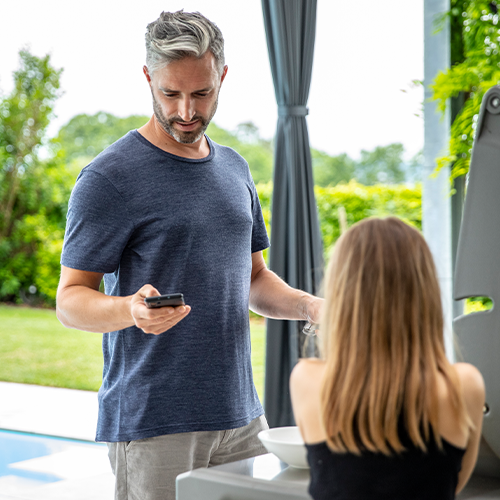
Intuitive invitation process
- All rights and functions are already released at the time of invitation
- The invited person can then independently assign their own fingers to the functions released for them
Smartphone opening possible without a fingerprint scanner
- Access via smartphone is now also possible without a previously saved finger – ideal for spontaneous invitations and flexible use
- An ekey bionyx account is required for this function
Granular rights management
- Owners benefit from a more individual rights concept with even more gradations
Temporary access for ekey partners
- ekey partners can be invited for activation for a limited period of time
- During the defined period, they have full system access – ideal for activations and initial configurations

Intuitive invitation process
– All rights and functions are already released at the time of invitation
– The invited person can then independently assign their own fingers to the functions released for them
Smartphone opening possible without a fingerprint scanner
– Access via smartphone is now also possible without a previously saved finger – ideal for spontaneous invitations and flexible use
– An ekey bionyx account is required for this function
Granular rights management
– Owners benefit from a more individual rights concept with even more gradations
Temporary access for ekey partners
– ekey partners can be invited for activation for a limited period of time
– During the defined period, they have full system access – ideal for activations and initial configurations
“When friends were staying with us for the weekend, I simply gave them app access at short notice. No need to organize keys, no need to return them – and everything can be removed afterwards with a click.”
Martin (36 years)
Access log
Central access log – everything at a glance. At all times.
A central access log is now available to you, which clearly bundles all access events in your system.
You can easily find this central overview in the “Settings” menu under “Access logs”. With the central log, you not only maintain an overview, but also increase the efficiency of your access control system administration – convenient, secure and well thought-out.
“I can see at a glance who has arrived and when – without having to go through individual devices or people. Super practical!“
Andreas (44 years old)
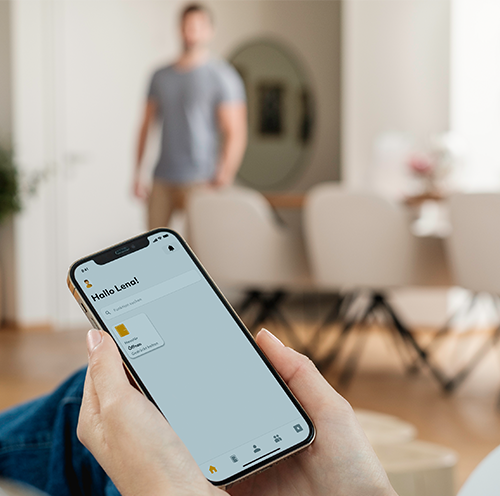
Advantages of the central access log
- All events at a glance: No switching between devices or people – one central log for the entire system.
- Maximum transparency: See who had access, when and where at any time – for full traceability.
- Individual details: Person and device-specific protocols will of course remain available.
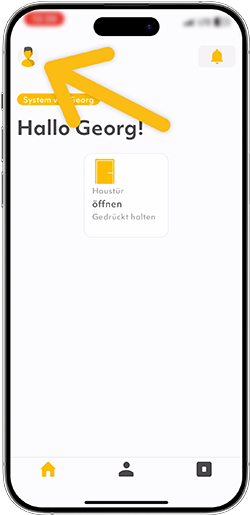
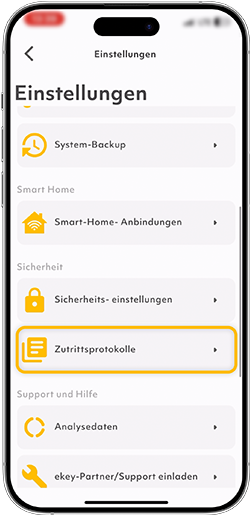
Advantages of the central access log
– All events at a glance: No switching between devices or people – one central log for the entire system.
– Transparency: See who had access, when and where at any time – for full traceability.
– Individual details: Person and device-specific protocols will of course remain available.
“I can see at a glance who has arrived and when – without having to go through individual devices or people. Super practical!”
Andreas (44 years)
Remote opening
Confirm remote opening – More control. More security.
With the new “Confirm remote opening” function, you retain full control. From now on, accidental remote opening of the door can be prevented: If the function is activated (“Settings” menu > “Security settings”), additional confirmation is required after triggering remote opening before the action is actually carried out.
“I’m often on the move and get a lot of app notifications. With the confirmation function, I know that nothing will open by mistake.“
Claudia (37 years old)
Advantage of remote opening
- Maximum control & security: The door only opens after your conscious confirmation – no unintentional triggering possible.
Advantage of remote opening
– Maximum control & security: The door only opens after your conscious confirmation – no unintentional triggering possible.
“I’m often on the move and get a lot of app notifications. With the confirmation function, I know that nothing will open by mistake.”
Claudia (37 years)
Release 5.1
The update brings more control to your everyday life – with the new schedule feature, you can flexibly control access by time. Ideal for time-limited access, such as for cleaning, delivery services or guests.
Timetable
Define time slots – Access at your own pace.
With the new schedule feature, you can control access according to time. Create an individual schedule with up to 10 freely definable time slots.
“My mother’s carer comes every day at 8 a.m. I’ve set up a fixed time slot – that provides security for everyone involved.”
Markus (51 years old)

Advantage of the time slots
- Assign the schedule to individual people to restrict their access rights – e.g. for cleaning staff, delivery services or guests.
Advantage of time slots
– Assign the schedule to individual people in order to restrict their access rights – e.g. for cleaning staff, delivery services or guests.
“My mother’s carer comes every day at 8 a.m. I’ve set up a fixed time slot – that provides security for everyone involved.”
Markus (51 Jahre)
iOS -> ekey bionyx App im Apple App Store bewerten
Android -> ekey bionyx App im Google Play Store bewerten
Einfügen in einen “Custom HTML”-Block in Gutenberg.
Inhalte im CONFIG-Objekt unten editieren.
–>
#ekey-exit-popup-root,
#ekey-exit-popup-root * {
box-sizing: border-box;
margin: 0;
padding: 0;
}
#ekey-exit-popup-root .ekey-exit-overlay {
position: fixed;
inset: 0;
background: rgba(0, 0, 0, 0.6);
z-index: 999999;
display: flex;
align-items: center;
justify-content: center;
padding: 20px;
opacity: 0;
animation: ekeyExitFadeIn 0.3s ease forwards;
font-family: ‘Source Sans 3’, ‘Source Sans Pro’, -apple-system, BlinkMacSystemFont, sans-serif;
}
@keyframes ekeyExitFadeIn { to { opacity: 1; } }
#ekey-exit-popup-root .ekey-exit-modal {
position: relative;
background: #fff;
max-width: 520px;
width: 100%;
border-radius: 8px;
box-shadow: 0 20px 60px rgba(0, 0, 0, 0.3);
overflow: hidden;
transform: translateY(20px);
animation: ekeyExitSlideUp 0.4s ease 0.1s forwards;
}
@keyframes ekeyExitSlideUp { to { transform: translateY(0); } }
#ekey-exit-popup-root .ekey-exit-close {
position: absolute;
top: 12px;
right: 12px;
background: transparent;
border: none;
color: #666;
cursor: pointer;
padding: 8px;
border-radius: 4px;
z-index: 2;
transition: background 0.2s;
line-height: 0;
width: auto;
height: auto;
}
#ekey-exit-popup-root .ekey-exit-close:hover {
background: rgba(0, 0, 0, 0.05);
color: #00457c;
}
#ekey-exit-popup-root .ekey-exit-body {
padding: 40px 32px 32px;
text-align: center;
}
#ekey-exit-popup-root .ekey-exit-stars {
font-size: 32px;
letter-spacing: 4px;
color: #ffb400;
margin: 0 0 16px;
line-height: 1;
}
#ekey-exit-popup-root .ekey-exit-subheadline {
color: #00457c;
font-size: 14px;
font-weight: 600;
text-transform: uppercase;
letter-spacing: 0.05em;
margin: 0 0 8px;
line-height: 1.3;
}
#ekey-exit-popup-root .ekey-exit-headline {
color: #1a1a1a;
font-size: 28px;
font-weight: 700;
line-height: 1.2;
margin: 0 0 16px;
text-transform: none;
letter-spacing: normal;
}
#ekey-exit-popup-root .ekey-exit-text {
color: #444;
font-size: 16px;
line-height: 1.5;
margin: 0 0 24px;
}
#ekey-exit-popup-root .ekey-exit-cta {
display: inline-block;
background: #00457c;
color: #fff !important;
text-decoration: none !important;
padding: 14px 28px;
border-radius: 4px;
font-weight: 600;
font-size: 16px;
line-height: 1.2;
border: none;
transition: background 0.2s;
text-transform: none;
letter-spacing: normal;
}
#ekey-exit-popup-root .ekey-exit-cta:hover,
#ekey-exit-popup-root .ekey-exit-cta:focus {
background: #003561;
color: #fff !important;
text-decoration: none !important;
}
@media (max-width: 480px) {
#ekey-exit-popup-root .ekey-exit-body { padding: 32px 24px 24px; }
#ekey-exit-popup-root .ekey-exit-headline { font-size: 22px; }
#ekey-exit-popup-root .ekey-exit-text { font-size: 15px; }
}
(function() {
‘use strict’;
/* ============================================================
* KONFIGURATION – hier den Content pflegen
* ============================================================ */
var CONFIG = {
cooldownDays: 7, // Tage Pause zwischen Anzeigen
minTimeOnPage: 10, // Desktop: Sek. bevor mouseleave-Trigger greift
mobileDelaySeconds: 15, // Handy (iOS + Android): Popup nach X Sek. auf der Seite
storageKey: ‘ekey_exit_popup_shown’,
variants: {
desktop: {
enabled: true,
headline: ‘Zufrieden mit ekey?’,
subheadline: ‘Ihre Meinung zählt’,
text: ‘Helfen Sie anderen bei ihrer Entscheidung und bewerten Sie ekey auf Trustpilot. Es dauert nur eine Minute.’,
ctaLabel: ‘Auf Trustpilot bewerten’,
ctaUrl: ‘https://at.trustpilot.com/evaluate/ekey.net’
},
ios: {
enabled: true,
headline: ‘Wie gefällt Ihnen ekey bionyx?’,
subheadline: ‘Ihre Bewertung hilft’,
text: ‘Sind Sie zufrieden mit der ekey bionyx App? Über eine kurze Bewertung im App Store freuen wir uns sehr.’,
ctaLabel: ‘Im App Store bewerten’,
ctaUrl: ‘https://apps.apple.com/at/app/ekey-bionyx/id1484053054’
},
android: {
enabled: true,
headline: ‘Wie gefällt Ihnen ekey bionyx?’,
subheadline: ‘Ihre Bewertung hilft’,
text: ‘Sind Sie zufrieden mit der ekey bionyx App? Über eine kurze Bewertung bei Google Play freuen wir uns sehr.’,
ctaLabel: ‘Bei Google Play bewerten’,
ctaUrl: ‘https://play.google.com/store/apps/details?id=net.ekey.bionyx’
}
}
};
/* ============================================================
* LOGIK
* ============================================================ */
function escapeHtml(str) {
var div = document.createElement(‘div’);
div.textContent = str || ”;
return div.innerHTML;
}
function detectDevice() {
var ua = navigator.userAgent || ”;
if (/iPhone|iPad|iPod/i.test(ua)) return ‘ios’;
if (/Android/i.test(ua)) return ‘android’;
if ((‘ontouchstart’ in window) && window.matchMedia(‘(max-width: 1024px)’).matches) return null;
return ‘desktop’;
}
function wasShownRecently() { ‘; var popupShown = false; var root = document.getElementById(‘ekey-exit-popup-root’); document.body.style.overflow = ‘hidden’; function close() { overlay.querySelector(‘.ekey-exit-close’).addEventListener(‘click’, close); if (wasShownRecently()) return; var pageLoadTime = Date.now(); if (device === ‘desktop’) {
try {
var raw = localStorage.getItem(CONFIG.storageKey);
if (!raw) return false;
var ts = parseInt(raw, 10);
if (isNaN(ts)) return false;
var ageDays = (Date.now() – ts) / (1000 * 60 * 60 * 24);
return ageDays
}
function showPopup(device) {
if (popupShown) return;
var variant = CONFIG.variants[device];
if (!variant || !variant.enabled) return;
popupShown = true;
markShown();
if (!root) {
root = document.createElement(‘div’);
root.id = ‘ekey-exit-popup-root’;
document.body.appendChild(root);
}
root.innerHTML = buildPopupHtml(variant, device);
var overlay = root.querySelector(‘.ekey-exit-overlay’);
if (!overlay) return;
overlay.style.opacity = ‘0’;
setTimeout(function() {
root.innerHTML = ”;
document.body.style.overflow = ”;
}, 200);
}
overlay.addEventListener(‘click’, function(e) {
if (e.target === overlay) close();
});
// Nach Klick auf CTA das Popup ebenfalls schließen
overlay.querySelector(‘.ekey-exit-cta’).addEventListener(‘click’, function() {
setTimeout(close, 100);
});
document.addEventListener(‘keydown’, function onEsc(e) {
if (e.key === ‘Escape’) { close(); document.removeEventListener(‘keydown’, onEsc); }
});
}
var device = detectDevice();
if (!device) return;
function readyToTrigger() {
return (Date.now() – pageLoadTime) >= (CONFIG.minTimeOnPage * 1000);
}
// Desktop: Exit-Intent über mouseleave am oberen Viewport-Rand
document.addEventListener(‘mouseleave’, function(e) {
if (!readyToTrigger()) return;
if (e.clientY <= 0) showPopup('desktop'); }); } else { // Handy (iOS + Android): Popup erscheint nach fester Verweildauer setTimeout(function() { showPopup(device); }, CONFIG.mobileDelaySeconds * 1000); } })();