



ekey integration for Control4
Fingerprint scanner events as smart triggers for professional Control4 projects
The integration of ekey fingerprint scanners into Control4 opens up new possibilities for smart home integrators, Control4 dealers, and project planners in sophisticated building automation projects.
Yet the ekey fingerprint scanner is much more than just a convenient access solution. It serves as a unique identifier: Control4 can respond to user and device events and use them to trigger custom scenes, automations, or notifications.
This page is intended for Control4 partners, system integrators, electrical contractors, and designers who wish to use ekey as a professional integration solution in high-end residential, smart home, and commercial projects.
Why access in the Control4 project goes beyond the basics
In many smart home projects, access is primarily viewed as nothing more than a door-opening function. However, the real added value is realized when access is viewed as an integral part of building automation.
A fingerprint scanner not only provides an unlock signal, but also unique information about who is entering a building, an area, or a door. This information can be used in the Control4 system as a trigger for user-specific scenes, automations, and notifications.
This is how access becomes a project-relevant trigger for high-quality smart home features.
This allows you to do the following in the project:
- Integrate access events into Control4 scenes in a targeted manner
- Trigger automations based on a person, a door, or a fingerprint scanner
- Control lighting, shading, climate, audio, security, and other systems based on user preferences
- Link intelligently presence, convenience, and building functions
- Implement personalized smart home experiences for end customers
- Configure group-based automations for family, employees, and visitors with optional custom actions
- Define an emergency fingerprint scanner to automatically trigger stored Control4 routines in case of an emergency
- Create additional project value compared to standard installations
The focus is on providing additional convenience for end customers and a clear integration strategy for professional Control4 projects.
The solution: ekey & Control4
With ekey and Control4, biometric access becomes an integral part of building automation. The connection is established using the appropriate Control4 drivers. Depending on the project, the ekey WLAN bridge can provide additional setup support, such as through automatic detection on the local network via SDDP and the provision of the exported ekey bionyx configuration. Alternatively, the configuration can also be entered manually in the Control4 Bridge Driver. Events from the ekey system can thus be processed directly in the Control4 system and linked to actions.
The following, among other things, can be processed:
- User events
Events that are associated with a specific user or finger and can trigger various automations in the Control4 system. - Device events
Events from individual access points that can be processed as triggers in the Control4 system. - Authorization and security events
Events related to access authorizations can be used for notifications, status information, or security-related processes.
This allows ekey to be integrated into new or existing Control4 projects without changing the underlying project architecture.
Principle of integration: clear roles

ekey fingerprint scanner
ekey performs secure identification and controls access. Biometric authentication, user management, and authorization remain within the ekey system.

Control4
Control4 processes events from the ekey system and uses them to control scenes, automations, notifications, and systems.
Typical applications in a Control4 project
An ekey fingerprint scanner for door stations and door communication
ekey can also be put to good use in door communication projects.
With Control4 door stations with ekey sLine, the integration can identify which person has authenticated themselves via fingerprint scanner. This information can be used in a targeted manner to customize door communication, video, and automation systems to meet individual needs.
For example:
- Access events can be combined with door communication and video
- User-specific scenes are triggered after successful authentication
- Smart home automations are set off based on the person the system authenticates
- Notifications or status information are processed based on the fingerprint scanner event
- Convenient building features can be activated right at the entrance
This creates a cohesive overall concept, from the entrance to the building automation system.


Security in practice with ekey & Control4
This integration expands the capabilities of building automation without altering the basic security logic of access control.
The access decision remains in the ekey system. Control4 receives events and uses them as triggers for further automations, scenes, and notifications.
This means:
- ekey identifies authorized individuals
- ekey makes the access decision
- Control4 processes events
- Control4 controls scenes and functions derived from this
- Access control is not being integrated into the building automation system
This clear separation supports a professional project architecture and reduces misunderstandings during planning, implementation, and technical support.
Software integration
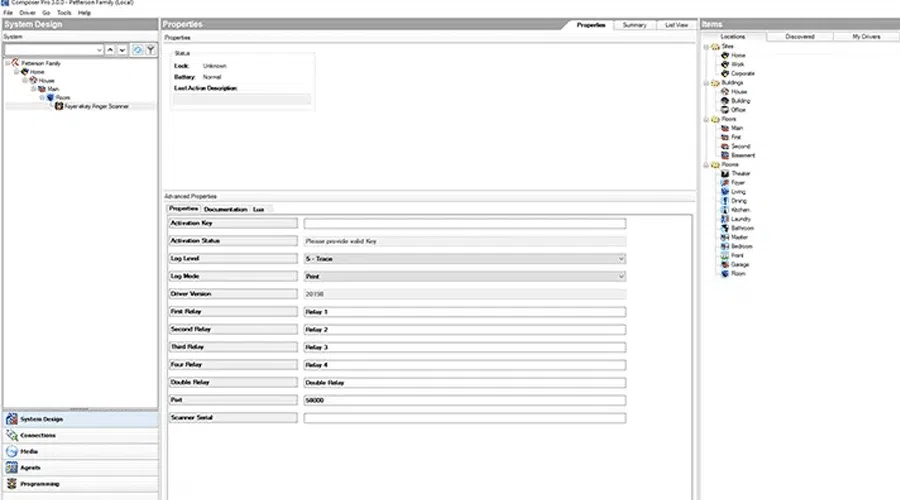
Test the driver and implement it in the project
ekey with Control4
The ekey Control4 driver is available as a trial version in the Download center and can be tested for free for 5 days with full functionality.
Depending on the project requirements, two options are available: the Control4 driver license alone for projects without a WLAN bridge, or the integration package with a WLAN bridge (including the license) if the setup is to be further supported by automatic detection via SDDP and the provision of the ekey bionyx configuration.